Top 5 Features to Look for in Document Management Software
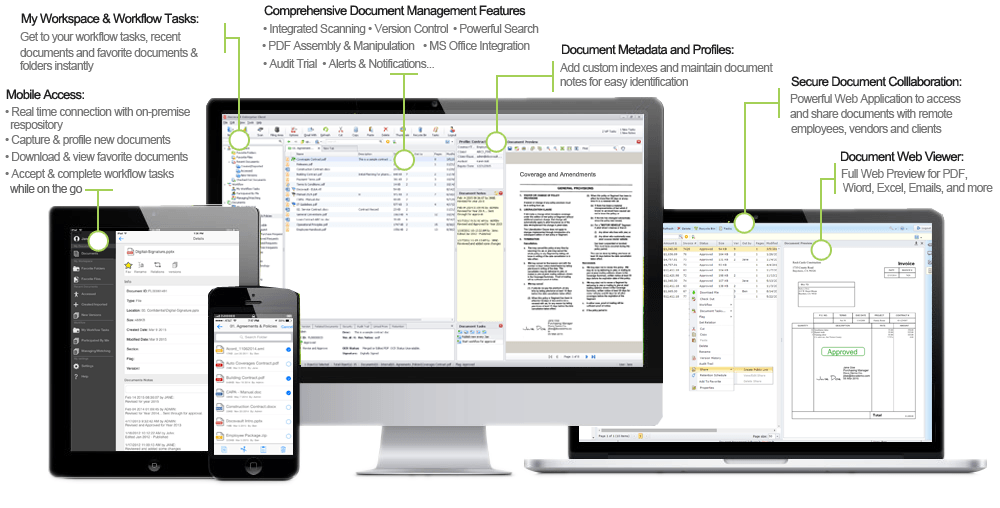
When evaluating Document Management Software, it's crucial to identify key features that enhance productivity and streamline workflows. Here are the top five features to prioritize:
- Robust Search Functionality: A powerful search tool enables users to quickly locate documents based on keywords, tags, or metadata, reducing time spent sifting through files.
- Version Control: This feature tracks changes made to documents, allowing you to access previous versions and maintain accountability among team members.
- User Permissions and Security: Ensuring that sensitive information is well-protected is essential. Look for software that allows custom user roles and permissions to control document access.
- Integration Capabilities: The ability to easily integrate with existing tools (like email and project management software) allows for a seamless workflow and enhances overall efficiency.
- Cloud Storage Options: With the rise of remote work, cloud-based document management solutions provide secure access from anywhere, ensuring that your documents are always within reach.
In addition to these features, consider the user experience of the software. An intuitive interface can significantly reduce the learning curve, making it easier for team members to adopt and utilize the system effectively. Furthermore, exploring customer support options and scalability can help in making an informed decision that meets your organization's long-term needs.
How Smart Software Can Help You Navigate Document Overload
In today's digital age, businesses are inundated with a vast array of documents, from contracts and reports to emails and proposals. This overwhelming document overload can lead to inefficiencies and confusion, impacting productivity. Fortunately, smart software solutions are designed to streamline document management processes, making it easier to organize, search, and retrieve relevant information. By implementing advanced algorithms and machine learning, these tools can categorize documents, prioritize tasks, and even extract key data, allowing users to focus on what truly matters.
Moreover, smart software often includes features like automated workflows and collaboration tools that enhance team communication. Rather than sifting through endless files, employees can quickly access the information they need, thus reducing the chances of errors. Ultimately, adopting such technology not only alleviates document overload but also fosters a more efficient work environment. As businesses continue to grow, leveraging the power of intelligent software becomes essential for maintaining organization and productivity.
Are You Drowning in Documents? Discover the Solutions You Need!
Are you feeling overwhelmed by the sheer volume of documents you have to manage? Drowning in documents is a common struggle for many professionals, especially in today’s digital age where information seems to multiply overnight. From invoices to contracts, emails to reports, the accumulation of paperwork can lead to inefficiencies and stress. To regain control, it’s essential to implement effective document management strategies tailored to your specific needs.
Fortunately, there are several solutions available to help you streamline your document workflow:
- Digitization: Scanning paper documents and storing them electronically can save space and make retrieval easier.
- Document Management Software: Utilizing specialized software can help you organize, search, and share documents more efficiently.
- Regular Audits: Periodically reviewing your documents can help you eliminate what you no longer need, preventing your workload from becoming unmanageable.